Inspiration and information for filmmakers everywhere
March 1, 2013 by neiloseman

Planning VFX: Traditional Techniques

Over a month ago I wrote a post about the advantages of computer generated imagery over more traditional ways of creating visual effects. Apologies for the delay, but here at last is the flipside of that coin: the advantages of old-school technqiues.

Here’s an alternate ending from Blade (1998)….

It was ditched after test audiences responded poorly to it. They had invested in the film’s villain throughout the movie and they felt cheated to see him turn into a CGI blobby thing for the final battle. The filmmakers cut the scene and replaced it with a sword duel between Blade and the baddie in human form.

This highlights CGI’s chief difficulty – it’s unreality. There is something disappointing about being served up an image that has been created with ones and zeros. It feels like a cheat. And that can take an audience out of the story.

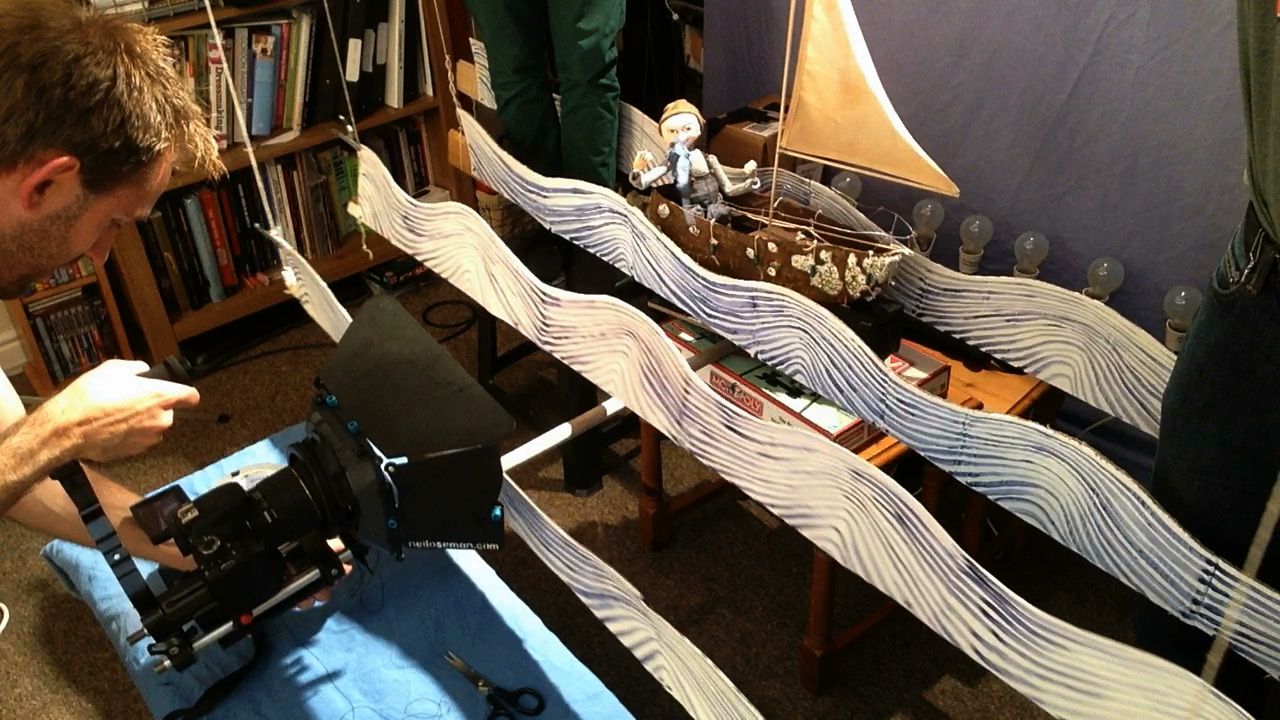
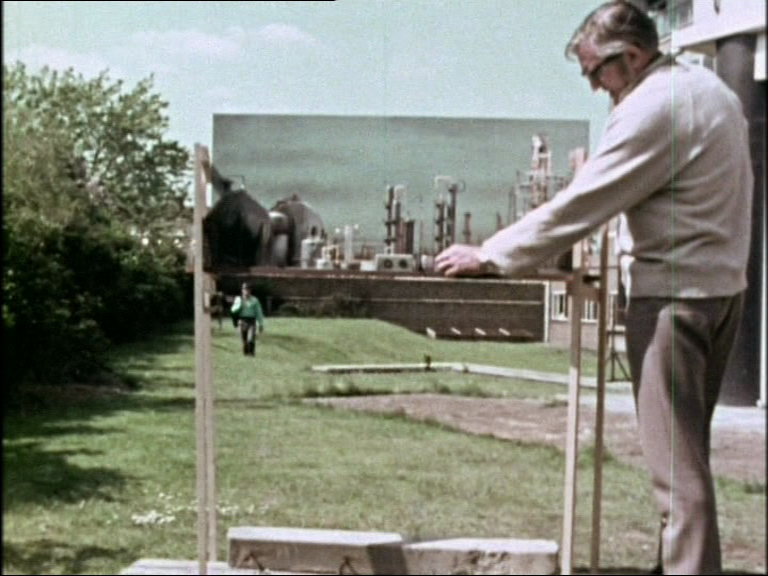
In contrast to CGI, model shots tend to look more realistic but move less realistically, due to the unavoidable physics involved. But there can often be a charm to this motion that allows us to forgive it. Indeed, I think the best reason to use traditional effects today is when you want things to look unreal in a very appealing way. Take for example Lemony Snicket’s A Series of Unfortunate Events, which used forced perspective and painted backdrops to create a beautiful fantasy world. Or The Life Aquatic’s stop motion marine creatures…. except that the animation was so good they looked real.

Some other advantages of traditional techniques over CGI:

  • Some techniques, like puppetry, can be achieved in camera, giving the actors something real to react to.
  • All the randomness of nature is automatically built in.
  • Effects like fire and water are theoretically easier, though in practice can be difficult to control and to scale correctly.
  • Today’s audiences are used to CGI and can generally recognise it, but model shots are perhaps more likely to fool them.

In writing this post I’ve realised how CGI has advanced even in the few years since I stopped actively developing The Dark Side of the Earth (an ambitious fantasy feature intended to include stop motion, puppetry, miniatures and matte paintings).

Almost no-one today is still shooting miniatures without enhancing them digitally. Savvy filmmakers like Peter Jackson, Duncan Jones and Sam Mendes combine models and CGI to get the best of both worlds. It seems traditional techniques alone can really only be used now as a deliberate stylistic choice. That saddens me. I’d be delighted if anyone can prove me wrong.

If anyone out there is contemplating using miniatures in their indie film, here are some tips…

  •   •   •   •   •
February 18, 2013 by neiloseman

It Never Rains but it Pours

This is a clip from the feature-length documentary Going to Hell: The Making of Soul Searcher. You can rent the whole doc digitally from the Distrify player below for a small charge, and you can watch Soul Searcher itself for free at neiloseman.com/soulsearcher

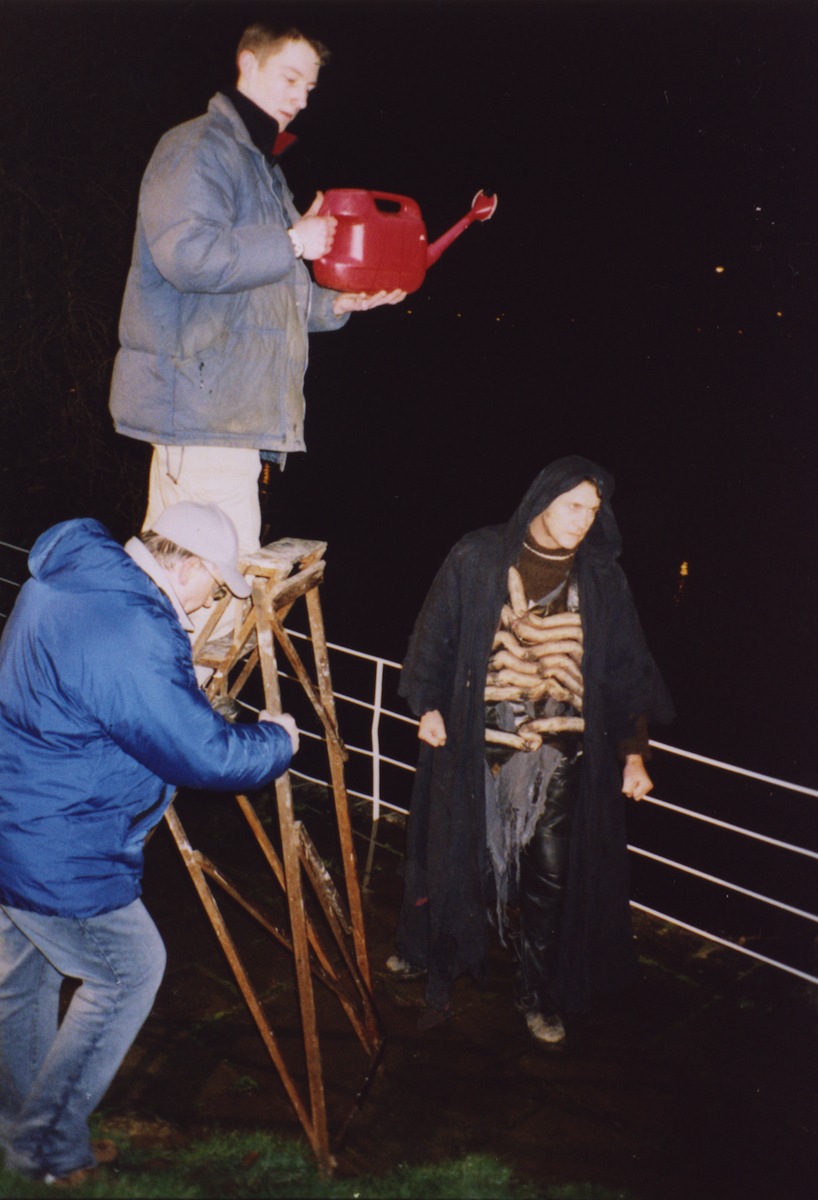
The clip shows how we created a fake downpour for a fight between the outgoing Grim Reaper, Ezekiel (Jonny Lewis, doubled by Simon Wyndham), and his replacement, Joe (Ray Bullock Jnr.). Ironically it was actually raining for real, but not heavily enough to show up on camera with the impact we needed. We’d had some rain bars made (lengths of hosepipe with holes drilled in them, strapped to bamboo canes) but we found the water squirted out in unrealistic jets. Luckily the location – Westons Cider in Much Marcle, Herefordshire – had a high pressure hose and we found that by pointing it upwards the water back down looking like rain.

See last week’s post for how to add rain (and snow) onto scenes after the fact.

  •   •   •   •   •
February 12, 2013 by neiloseman

Falsification of Precipitation

Yesterday I had to shoot some fake snow. Ironic, I know, given the weather lately, but it had to be composited over a pre-existing shot. Various software plug-ins are available to add snow to a shot, but I’m of the school of thought that says it’s always better to use a real thing. Even if it’s a fake real thing.

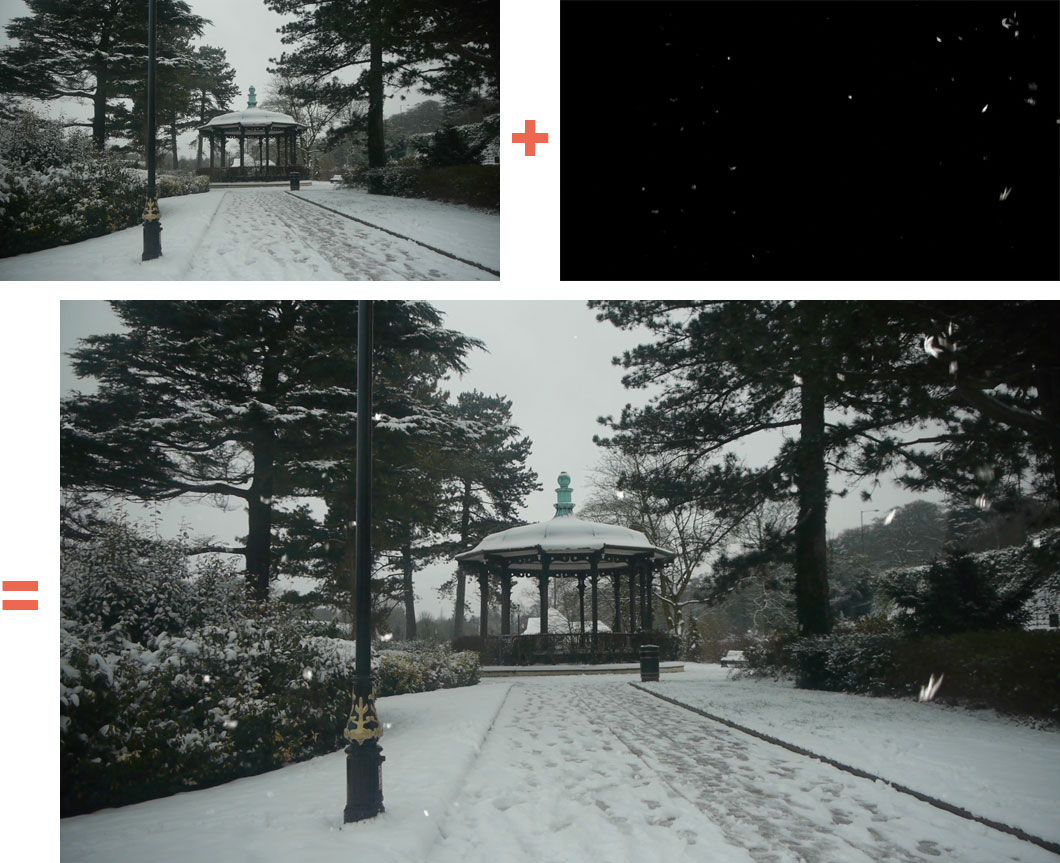
A few years back, Col sent off for some free samples of artificial snow from a weather effects company called Snow Business. (Eternal winter in Narnia? That was them.) When Miguel pointed out that a snow-covered shot of Belper’s bandstand in Stop/Eject looked like a still photograph in the edit, I saw a way to make use of these samples to bring some movement into the frame.

From the box of samples we picked one that appeared to be made of shredded carrier bags, because it floated the most realistically as it fell. I suspect you could make some of this yourself with a lot of patience and a few trips to Tesco. I set up black drapes with a redhead poking over the top to ensure that the snowflakes would be backlit without any direct light falling on the drapes. Then we rolled the camera and started sprinkling.

Afterwards it was a simple case of using screen mode (or ‘Add’ in Final Cut Pro) to combine the footage with the background shot. This mode gives exactly the same results as double-exposing a traditional photograph would: the black areas naturally become transparent because they have no brightness.

Must resist temptation to use snow-based puns...

Must resist temptation to use snow-based puns...

Several years ago, Col and I did exactly the same thing with rain, filming water from a hosepipe in his back garden against a black night sky, then layering it on top of scenes from Soul Searcher.

Must also refrain from rain puns. Uh-oh, I said "refRAIN"...

Must also refrain from rain puns. Uh-oh, I said "refRAIN"...

We also shot one scene for Soul Searcher in “real” rain – real in so far as it was actually there falling on the actors, but not in so far as it actually came from clouds. Perhaps I’ll upload a behind-the-scenes clip of that for my next post.

Meanwhile, if you’re going out to shoot in real snow, check out the tips I posted a couple of weeks ago.

  •   •   •   •   •
February 10, 2013 by neiloseman

Random Events on Stop/Eject

Mystery grave

Mystery grave

Here are some of the assorted things I’ve been doing on Stop/Eject lately.

On Wednesday I returned to the Hereford cemetery where, almost a decade ago, in the small hours of a cold and rainy October night, I shot a scene from Soul Searcher. This time I was just there to photograph gravestones for a VFX shot.

On the same day compositing/rotoscoping artist David Robinson delivered the first offical VFX shot, a run-of-the-mill wire removal but extremely well done.

On Friday I recorded this thank you message for everyone who sponsored the project:

Apologies to anyone whose name I’ve mispronounced.

Yesterday Scott Benzie delivered a demo of his beautiful theme for Kate. Much as I liked the first piece he wrote – listen to it here – I felt it emphasised the film’s fantasy aspects too much, and this new piece instead concentrates solely on drama and emotions.

This morning I filmed the tape recorder for probably the last time – not for Stop/Eject itself, but for the DVD/Bluray menus. Tomorrow the recorder gets sent off to Henning Knoepfel so he can record some new foley effects with it (that’s with it, not on it). Henning and I had a great conversation about the direction the sound should take and I’m very excited about how it will turn out. More on that on this blog in due course.

  •   •   •   •   •
February 7, 2013 by neiloseman

Poor Man’s Process

The WidthScribe promotional video I recently completed for Astute Graphics involved the actress driving a car – except we ended up casting an actress who can’t drive. We got around this in a few different ways, including the obvious substitution of a qualified driver in the wide shots, complete with appropriate wig.

Perhaps the most interesting technique we used, and one which I might well have used even if she could drive, was Poor Man’s Process. Nowadays, most fake driving shots in films and TV shows are achieved by shooting against a greenscreen and replacing that screen in post with a moving background plate. A more traditional technique is to film against a rear projection screen – a screen onto which previously-shot footage of a moving background is projected in real time behind the actors. This was known as Process Photography.

Poor Man’s Process leaves out the screen altogether, shooting against a plain, ambiguous background that doesn’t reveal the lack of movement – typically empty sky. Careful use of camera movement and dynamic lighting create the illusion of movement.

Here is the set-up we used on the WidthScribe promo.

Making the magic

Making the magic

The car is parked on Nick’s drive, which is conveniently sloped so that – from the camera’s point of view – only sky and a bit of a distant tree are visible in the background.

A light behind the car represents the sun, and Nick chops a piece of cardboard up and down in front of it to represent the shadows of passing trees.

Low budget wind machine

Low budget wind machine

Sophie operates a hairdryer to blow Laura’s hair around.

Col shines a reporter light into the lens, moving it around to create the impression of the sun changing position relative to the camera.

And I dolly the camera side-to-side while vibrating it ever so slightly.

When intercut with wide shots of Nick’s wife driving the car for real, you’d never know the close-ups were cheated. (An additional trick we employed was to sit Laura in the passenger seat of the moving car then flop the image in post, for the over-the-shoulder shot of the pylon passing by.)

The drapes are to cut out the reflections in the windscreen.

The drapes are to cut out the reflections in the windscreen.

Poor Man’s Process works best at night, but with the shallow depth of field provided by DSLRs it’s now possible to get away with it in daylight too, so long as the shot is kept fairly tight and the road you’re meant to be driving on is fairly open.

You’ll want to vary the lighting effects you use according to the surroundings the car is supposed to be in. You can use spinning mirrors to sweep “headlights” or “streetlights” over your actors, or move a keylight representing the sun or moon slowly side-to-side, or even place two out-of-focus bulbs in the background of your shot to represent another car behind.

I’ll leave you with an example of Poor Man’s Process in use on a big-budget Hollywood film, Michael Bay’s 1997 Alcatraz actioner, The Rock. All the close-ups in the cars were shot static in a car park.

  •   •   •   •   •
November 18, 2012 by neiloseman

Double Vision

When I first started making amateur films with my grandad’s Video8 camcorder, the only “actors” I had available were me, my friend David Abbott and occasionally my sister. Even a little later on, when I managed to rope in a few extra friends, there were still far more characters than actors. The solution? Each person – with the addition or subtraction of a hat, jacket or pair of glasses – portrayed multiple characters.

While this massively confused the audience (which fortunately consisted of only my parents), it did teach me a thing or two about how to shoot scenes in which one actor plays two characters. Below is a run-down of the various techniques you can use next time you shoot a script featuring time travel, parallel universes or uncanny doppelgängers. Back in the nineties, when I was making amateur films, there was no way of combining two separate video images on screen at once (without a hugely expensive video mixer), so only the first two of these techniques were available to me. Nowadays they can all be done with a green sheet, a decent home computer and the right software.

1. Ordinary cuts

The simplest method is to block your shot so that one doppelgänger’s face is not seen, be it out of focus, turned away from camera, in shadow or whatever. Simply dress a stand-in in the right clothes and make sure their hair matches. Two over-the-shoulder shots, each with a stand-in providing the foreground shoulder, can be edited into a very natural conversation.

Katie Lake (foreground) doubles for Georgina Sherrington (background) as the character of Kate steps into her own past in Stop/Eject.

Katie Lake (foreground) doubles for Georgina Sherrington (background) as the character of Kate steps into her own past in Stop/Eject.

2. Hidden cuts

It’s possible to pan from one doppelgänger to another, without any post-production effects, so long as the pan is very fast – a “whip” pan. There is so much motion in a whip pan that the eye will not detect a cut in the middle of it. Alternatively, track the camera so it passes close behind a foreground object or character; use the moment of darkness as this object wipes frame to hide a cut.

A quick camera move behind a foreground wall masks a cut from Johnny Cartwright to Johnny Cartwright in The Picnic.

A quick camera move behind a foreground wall masks a cut from Johnny Cartwright to Johnny Cartwright in The Picnic.

3. Split screen

As long as your camera is locked off, it’s the work of seconds in post to create a simple split screen effect using your editing software’s crop tool. If a straight vertical line doesn’t suit your shot, more unusual matte lines can be created with a garbage matte filter. Watch out for changes in lighting when you shoot the two elements, particularly when filming outdoors, and beware of shadows crossing the matte line. If you can afford to hire a motion control rig for accurately repeatable moves, your camera doesn’t even need to be locked down.

Elizabeth Shue plays both old and young Jennifer in a split screen shot from Back to the Future Part II (1989).

Elizabeth Shue plays both old and young Jennifer in a split screen shot from Back to the Future: Part II (1989, dir. Robert Zemeckis).

4. Green screen

If you try to use technique 3 for a shot where one doppelgänger passes in front of the other, you’ll quickly find it a post-production nightmare of painstaking matte animation. Instead, shoot the foreground doppelgänger against a green screen. As always with green screen work, light carefully to reduce spill and match the background plate.

Peter Kay is green-screened over an element of himself and Patrick McGuinness in the 2005 Comic Relief music video "(Is This the Way to) Amarillo".

Peter Kay is green-screened over an element of himself and Patrick McGuinness in the 2005 Comic Relief music video (Is This the Way to) Amarillo.

5. Face replacement

This is the only suitable technique when your doppelgängers are in close physical contact and both faces are visible. The action is performed by the actor and a stand-in, who may wear a green hood with tracking marks on it. Later, the actor performs the second character against a green screen, wearing a green body suit, with the angle and lighting carefully matched to the earlier shot. This isolated face, or the entire head, can then be tracked onto the stand-in. (Alternatively, on a big budget, the actor’s head may be cyber-scanned and a CG version of it tracked onto the stand-in.) Beware that only experienced VFX artists will be able to pull this off convincingly.

One of the many face replacement shots in the climactic fight of the dimension-hopping Jet Li vehicle The One (2001, dir. James Wong)

One of the many face replacement shots in the climactic fight of the dimension-hopping Jet Li vehicle The One (2001, dir. James Wong)

The best approach is to mix as many techniques as possible, relying mostly on the simpler ones but hitting the audience with a more effectsy one every now and then to sell the doubles. Happy sci-fi shooting!

  •   •   •   •   •
October 17, 2012 by neiloseman

Top Five Low Tech Effects

Hollywood is known for its wallet-busting excess. James Cameron, Ridley Scott, Michael Bay, George Lucas and J. J. Abrams probably spend close to a billion dollars a year between them making their blockbuster movies. But all of these directors (or at least their visual effects supervisors) know that sometimes the cheapest, simplest trick is the most effective. Here’s my run-down of the top five best low-tech effects in massive movies.

5. Jedi camera tricks

George Lucas is a filmmaker who was at his best when constrained by clunky technology, and that was certainly the case when he made the first Star Wars film. The motion control work produced by the nascent ILM may have raised the bar for every movie to follow, but Lucas frequently had to resort to much simpler techniques to put the world he imagined on the screen.

Star Wars

Star Wars

To make Luke’s landspeeder appear to hover, a mirror was attached in front of the wheels, reflecting empty desert. Some optical work was required to complete the effect, but Lucas got 90% of the way there in-camera. Sadly his approach to filmmaking is now exactly the opposite.

Space Jockey

Space Jockey

4. Space Jockey kids

When Diddly Squat came on board Alien, his vision was to take the B movie script and turn it into an A picture. This was embodied by the huge Space Jockey which the Nostromo’s crew find in the alien derelict. The studio didn’t want to pay for the massive sculpture, but Squat insisted it would raise the production values of the whole film and he got his way. When it was built, however, it still wasn’t big enough for him. The solution? If you can’t make the Space Jockey bigger, make the people smaller. He drafted in his kids and the DP’s, had the costume department whip up some small-scale spacesuits, over-cranked the camera and – bingo! – the Jockey looks twice as big.

3. Sie haben meine green screen gestohlen

The cinema of Michael Bay is like a twelve-year-old boy’s wet dream: explosions, car crashes, toy robots and Megan Fox. His best work, I suggest, is his 1996 film The Rock, featuring a destructive car chase around the streets of San Francisco. Amongst all the money shots of falling telegraph poles, coin-spraying parking meters and exploding trams (“Where’s that son of a bitch at? I’m gonna hunt him down! That mother fucker ain’t safe nowhere!”) are close-ups of the characters driving which were executed in a way a twelve-year-old would be proud of.

Did Bay put the car on a low-loader and tow it through the streets? No. Did he put up a green screen and comp in the backgrounds? No. Did he go old-school and use rear projection à la 24? No. He simply parked the car in a place where only empty sky could be seen behind, rigged a couple of out-of-focus lights in the background on dollies, ordered a bunch of grips to rock the car and shook the camera for all he was worth.

This technique is known as Poor Man’s Process, and is most commonly used for night driving scenes. But Bay had the genius to see that in a fast-paced action scene, as long as he kept the camera moving (note all the zooming) he could get away with it. To my mind it actually looks better than if it had been done for real, because the technique forced him to make the camerawork frenetic, which adds to the energy of the sequence.

2. Masking an edit

Arguably the highlight of J. J. Abrams’ masterful third instalment in the Mission: Impossible franchise is the scene in which we finally get to see the whole process of making and applying one of those miraculous masks. In a single shot we see Tom Cruise put on the mask and Ving Rhames blending the edges until Cruise looks like an utterly convincing Philip Seymour Hoffman. There are many ways to transform one actor into another with digital technology, and while such technology was doubtless used to smooth out the transition, the shot has a very simple trick at its heart: as the camera tracks behind Rhames’ back, the momentary darkness is used to hide a cut.

Abrams employs the same technique in his equally brilliant Star Trek reboot, when Scotty accidentally transports himself into a water pipe in the engine room. Released from the pipe, he falls painfully to the ground and then gets up and dusts himself off in the same shot. A foreground pillar wiping frame conceals a cut from the stuntman to Simon Pegg.

Titanic

Cardboard Titanic

1. Cardboard Titanic

Before he fell in love with performance capture, presumably as a result of getting the bends while shooting Ghosts of the Abyss, James “King of the World” Cameron was very canny with his visual effects. His films invariably ran the gamut of techniques, from the most cutting edge technology of the time to the oldest tricks in the book. So while Terminator 2 pushed the envelope with its computer-generated T-1000, Cameron was not averse to dressing Robert Patrick up in bacofoil for quick shots of the liquid metal villain in motion. And Aliens’ climactic nuke cloud was a cotton wool sculpture with a light bulb in the middle.

But perhaps Cameron’s most remarkable low tech effect comes in the second reel of his 1997 smash hit Titanic. The crew famously built a near-complete full-scale replica of the titular liner on the Mexican coast, while shots of the vessel at sea utilised a 45ft miniature surrounded by CG water and populated with motion-captured passengers (then a brand new technology). But when FX geniuses Robert and Dennis Skotak needed to put the Titanic into a green-screen shot of Jack and company playing poker in a dockside pub, they simply stuck a photo blow-up of the model to a piece of cardboard and dressed a Hornby train set in front of it. They called it the ship of dreams. And it was. It really was.

  •   •   •   •   •
October 13, 2012 by neiloseman

Stop/Eject Trailer VFX Breakdown

The following post has been created and released because you lovely people out there have between you contributed over £900 to the post-production funding of my fantasy-drama Stop/Eject. Visit stopejectmovie.com to become part of the project if you haven’t already.

Since Stop/Eject is still being edited, work has not yet begun on the visual effects for the film itself, but the trailer we released in May features three representative FX shots and it’s these that I’m now going to take you through. First, watch the trailer if you haven’t already.

And here’s the breakdown video. A full explanation of the steps involved can be found below.

Dan’s Death

This is a key shot and was carefully planned. I wanted it to be in slow motion, but the Canon 600D we used can only over-crank to 50 frames per second if the resolution is lowered from 1080P (full HD) to 720P. I built this limitation into the VFX design.

Firstly a wide shot of the shop facade was recorded at 1080P25. This was deliberately done in the morning, when the shop was in the sun and the opposite side of the street was in the shade, in order to minimise the genuine reflections. Then Kate (Georgina Sherrington) was shot emerging from the shop at 720P50, with the camera mounted on its side and framed solely on the doorway. This slow motion element could then be placed within the larger 1080P25 frame recorded earlier, maintaining the image resolution.

Dan (Oliver Park) and the car were shot in a car park with a locked-off camera, the former at 720P50 to ensure his movements matched the slow motion of Kate’s, and the latter at 1080P25 with the car driving at half the speed it should have been. These two elements were combined with a simple feathered crop. The collision will never be seen, so he simply vanishes at the critical moment. I figured the lower resolution of Dan would not be noticeable once this element was composited as a reflection.

In Photoshop, I created an alpha matte of the shop’s windows and door. I applied this to the Dan/car composite, then layered it on top of the Georgina/shop composite with an opacity of about 50% to give the impression of a reflection.

The door’s alpha matte was key-framed to distort as Kate opens it. The final step was to animate this part of the reflection to pan sideways with motion blur and fade out as the door opens.

Rehearsing the "ghostly Kate" scene. Photo: Paul Bednall

Rehearsing the "ghostly Kate" scene. Photo: Paul Bednall

Ghostly Kate

Kate and Dan were shot separately for this, with the camera locked off. For both elements I created a difference matte in Final Cut, whereby the computer compares the element with a base image, in this case the same locked-off shot without either character present. I could then important these mattes into Shake and clean them up using rotoshapes and Quickpaint nodes.

Further use of these tools was made to animate the intersection of the two characters, revealing Kate little by little as she passes through Dan, all the time striving to give the impression that both bodies are three-dimensional. (Here I drew on many über-geeky teenage hours spent watching VFX shots in Quantum Leap and Red Dwarf frame by frame on my VCR, admiring the artistry and trying to figure out the technical trickery.)

After subtracting one matte from the other, I imported the result back into Final Cut and applied it to the original Dan element, placing the Kate element beneath to generate the final composite. A separate, static matte for the foreground records was used to layer them back on top, and an artificial camera move was applied to the whole thing to take the curse off the locked-off look. This move was possible without loss of image quality since we had shot 16:9 but were masking to 2.35:1, so we had surplus material at the top and bottom of frame.

Tape Archive

Not a tape in sight. Photo: Paul Bednall

Not a tape in sight. Photo: Paul Bednall

Hopefully you didn’t even spot that this was a VFX shot. Sophie spent many sleepless nights labelling hundreds of cassette cases for the basement scene, but even these represented only a small fraction of the number required to fill the master shot. Therefore it was always planned to lock off the camera and fill in the missing tapes digitally.

I started by exporting a single frame to Photoshop, where I used primarily good old copy-and-paste, plus a bit of airbrushing and a lot of distorting and resizing, to clone the real tapes many times over. I then imported this layered file into Final Cut.

Next came the most time-consuming part. Hold-out mattes had to be generated for Kate and Alice (Therese Collins) to keep them in front of the cloned tapes. These were created in Shake as rotoshapes and key-framed every few frames to follow the characters’ movements. Once applied back in Final Cut, the foreground characters and falling tapes appear to occlude the digital tapes in the background as you would expect.

That’s all, folks. Please keep the donations coming. We’re just £43 away from the £1,000 mark and the next public reward – the podcast covering day four of the shoot.

  •   •   •   •   •
August 21, 2012 by neiloseman

The Power of Post

Ray Bullock Jnr. as Joe

Ray Bullock Jnr. as Joe, preparing to fight the marauding demon

As we search for an editor for Stop/Eject, here’s a demonstration of the power an editor wields.

A few weeks before the premiere of Soul Searcher, my fantasy-action feature about a trainee Grim Reaper, I showed the film to my flatmates of the time. One comment concerned a scene in which the trainee reaper, Joe (Ray Bullock Jnr.), fights a demon (Shane Styen) while drunken revellers cheer him on.

As scripted, the scene covers only the start of the fight – enough to show how cocky Joe has become in his new role. (On the day of shooting we decided to extend the scene to show Joe killing the demon, but after a couple of shots Shane injured himself, forcing us to revert to the shorter version.) My flatmate wanted to see Joe kill the demon, and I decided he was right.

I certainly wasn’t going to do a reshoot at that stage in the game, but nonetheless I was able to alter the scene to have the demon die. I did it in three steps, and these conveniently illustrate the three prongs of attack you can use in post-production to change and improve your story.

  1. Re-purpose existing footage. The demon knocks Joe’s scythe from his hand early in the scene, so my first challenge was to get the hero his blade back so he could strike the fatal blow. Fortunately I had left the camera running while shooting a series of takes of Joe’s scythe hitting the ground. Therefore I had also caught the scythe being picked up on camera. This was never intended to be used, but it worked a treat.
  2. Visual effects. I’m no fan of digital fixes, but there’s no denying they can get you out of a tight spot. The existing cut of the scene had a shot of Joe walking up to the demon, but now I needed to put the scythe into his hand, so I cut out the scythe from a freeze-frame of another shot and motion-tracked it to Joe’s movements.
  3. Sound. This is the most commonly-used tool for changing things in post. Any time in a movie that a line of exposition is delivered without the speaker’s mouth being clearly seen, chances are that it’s Additional Dialogue Recording (ADR). It’s far easier to get the actor into a recording studio to perform a new line than to go back to a location or a long-struck set and reshoot. But in this case all I needed to do was put in some slicing, crunching sounds and a grunt, which I ran over a handy shot of the drunken revellers.

Here is the original scene followed by the bits I changed and then the final version:

Remember that with great power comes great responsibility. I’ve heard of actors who’ve found themselves edited into scenes they’d never shot. If you’ve substantially changed the character with your tinkerings, or placed an actor into a sensitive or controversial scene, be sure to discuss it with them just as you would have done beforehand if it had been shot conventionally. The same goes for the writer if you’ve made a big change to their script.

Some might look at all this as cheating, and I confess I have mixed feelings about it myself. I believe in getting things right in-camera, but the reality is that all films are prototypes, and you’re often well into post-production – at least – before you really figure out what the best way is to make this particular movie.

  •   •   •   •   •
August 4, 2012 by neiloseman

Window Smash Effect

Tomorrow I’m off to Derbyshire for a few days, this time to lens Sophie’s short film, Ashes. I’m sure I’ll have some interesting things to tell you about that shoot when I’m back.

But in the meantime, here’s one from the archives. This is one of the featurettes from The Beacon‘s long-forgotten DVD in which I break down a crude but effective VFX shot.

Compositing elements shot against black in my living room was an MO I heavily expanded on when I made my next feature, Soul Searcher, and you can see the extensive break-downs for that film by renting or buying the deluxe package below.

  •   •   •   •   •